Tools
Every action the companion can take
The companion acts through tools: 36 built-in, plus whatever connectors add. Each carries a risk level, and under the Balanced approval policy that level decides what happens: safe runs silently, sensitive and dangerous ask first. Any built-in tool can be switched off in Settings → Tools.
Before slow or outside actions, the companion briefly says out loud what it's doing. It does this for web search, reading web pages, downloads, sending files, searching files by name or content, checking the Scheduler, and any connector tool.
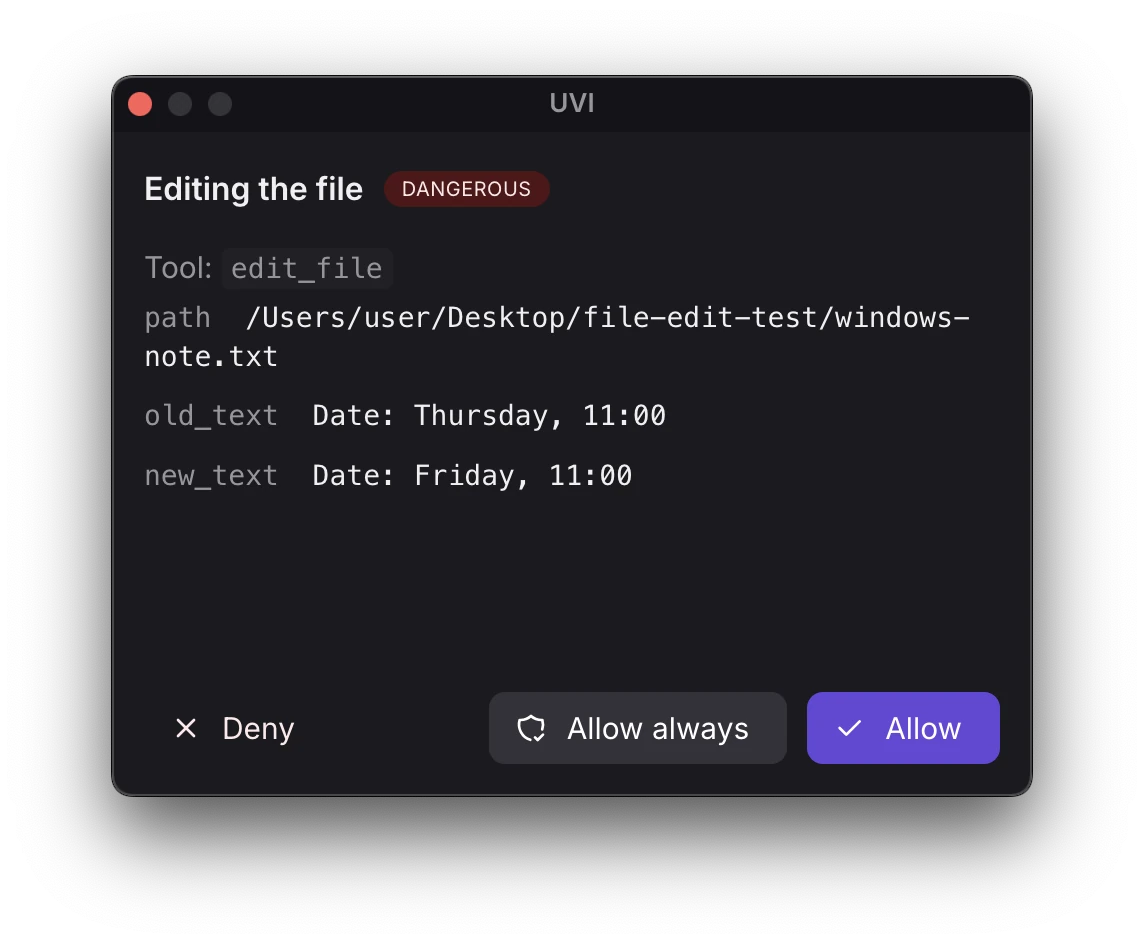
When an action needs confirmation, a window appears on top of everything (even in companion mode). It shows exactly what the companion is about to do: the action name, the risk level, the tool and its arguments. The arguments are shown one by one: short ones on a line, long text (a file's contents, an edit, a message) in full, with its line breaks. Hidden characters appear as codes, so nothing can hide in the arguments.
Buttons: Deny, Allow always (adds the tool to the always-allowed list of the current profile) and Allow.
| Tool | Risk | What it does |
|---|
take_screenshot | sensitive | See the screen (needs a vision model) |
| Tool | Risk | What it does |
|---|
web_search | sensitive | Search the web (needs a Web Search provider) |
web_fetch | sensitive | Fetch a page and read its main text |
download_file | sensitive | Download a file (to Downloads by default, up to 100 MB) |
All file tools work only inside the folders allowed in Settings → Security.
| Tool | Risk | What it does |
|---|
read_file | sensitive | Read a text file or extract text from a document: PDF, Word (.docx), Excel (.xlsx), PowerPoint (.pptx), OpenDocument (.odt/.ods/.odp), RTF, EPUB. Long files are read in parts |
list_dir | sensitive | List files and subfolders |
search_files | sensitive | Find files/folders by name |
search_in_files | sensitive | Find text inside files and documents, in one file, a folder or all allowed folders |
read_image | sensitive | Look at an image (needs a vision model) |
| Tool | Risk | What it does |
|---|
write_file | dangerous | Create a text file, rewrite a short one entirely, or append to the end |
edit_file | dangerous | Change part of a text file: replace a fragment, the rest stays untouched |
delete_file | dangerous | Move a file to the trash (recoverable) |
move_file | dangerous | Move or rename a file/folder |
copy_file | dangerous | Copy a file/folder |
create_folder | sensitive | Create a folder |
| Tool | Risk | What it does |
|---|
open_url | safe | Open a link in your default browser |
open_path | sensitive | Open in the default app |
open_app | dangerous | Launch an application by name (on Windows, any app from the Start menu, Microsoft Store apps included) |
show_in_folder | safe | Reveal in Finder/Explorer |
| Tool | Risk | What it does |
|---|
remember | safe | Save a fact to long-term memory |
recall | safe | Search long-term memory |
update_user | safe | Update facts about you (USER.md) |
| Tool | Risk | What it does |
|---|
get_time | safe | Current date, time, timezone |
set_reminder | safe | One-time spoken reminder |
schedule_task | safe | One-time or recurring task with actions |
list_scheduled | safe | Look up reminders and tasks in the Scheduler |
wait | safe | Pause for up to 30 seconds before the next step |
wait helps in skills where a step needs time to finish, such as a web player loading before music can start. Say in the skill how long to wait and what to check afterward.
| Tool | Risk | What it does |
|---|
clipboard_read | sensitive | Read the clipboard (text, image or file name) |
clipboard_write | sensitive | Write text to the clipboard |
system_info | sensitive | OS, CPU, memory, disk, uptime |
| Tool | Risk | What it does |
|---|
save_attachment | sensitive | Save an attachment from a messenger or API request (up to 20 MB) |
send_file | dangerous | Send a file to a messenger chat or back to an API caller |
| Tool | Risk | What it does |
|---|
compact_conversation | safe | Compress the dialog into a summary checkpoint |
load_skill | safe | Load a skill's full instructions |
These two tools are available while "Speaker recognition" is on in Settings → Voice. They don't appear on the Tools tab.
| Tool | Risk | What it does |
|---|
enroll_speaker | safe | Remember a person's voice by name |
forget_speaker | safe | Forget a saved voice |