API
Talk to the companion over local HTTP
The app can expose a local HTTP server so external tools and scripts can message the companion. Off by default; enable it in Settings → API. The server is shared by all profiles, and the active profile answers its requests.
Enabling
- Enable API server starts the server on port 4820 (configurable).
- The app generates an Access token on first enable, and every request must carry it:
Authorization: Bearer <token>. Regenerate invalidates the old token immediately. - Allow LAN access also accepts requests from other devices on your network.
- Example request shows a ready-to-run
curlcommand with your current port and token; Copy request copies it.
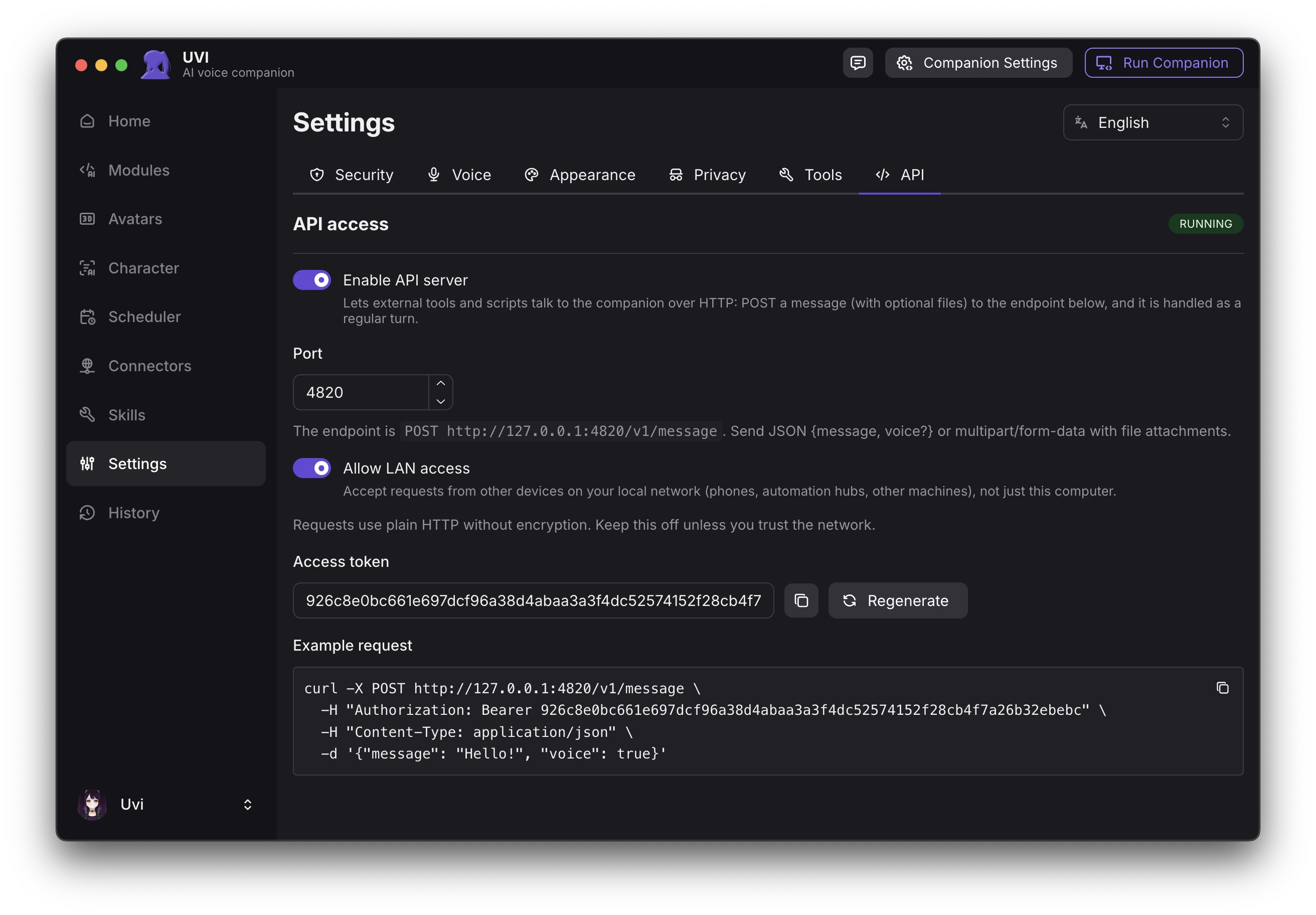
Requests use plain HTTP without encryption: on an untrusted network the token can be intercepted, and whoever has it can talk to your companion. Keep LAN access off unless you trust your network.
Sending a message
The only endpoint:
POST http://127.0.0.1:4820/v1/message
Authorization: Bearer <token>
Content-Type: application/json

{ "message": "Hello!" }message— the text (required unless files are attached). The special value/newresets the session.webhook— optional http(s) URL that receives the reply instead of the HTTP response.voice— whether to also speak the reply on the desktop (defaultfalse).wait— set it tofalseto get an immediate202instead of waiting for the reply. Ignored when awebhookis set.
Alternatively send multipart/form-data with the same string fields plus any number of file parts.
Responses
By default the connection stays open until the companion finishes the turn, and the reply comes back in the body with 200:
{ "id": "…", "type": "reply", "text": "…", "model": "…" }Files the companion sends back (the send_file tool) travel in the same response, as a files array of {fileName, mediaType, data} with base64 data. A turn that fails answers 500 {"id": "…", "error": "…"}. Pick your own timeout — dropping the connection doesn't cancel the turn, and the reply still lands in History.
With a webhook the endpoint answers immediately with 202 {"accepted": true, "id": "…"} and sends the same JSON to the webhook as a POST once the turn ends. Files arrive there as separate POSTs: {"type": "file", "fileName", "mediaType", "data"}.
With "wait": false and no webhook the request is fire-and-forget: an immediate 202, and the reply stays in the app (History, plus speech if voice: true).
Error codes: 400 validation, 401 bad token, 413 body over 50 MB or file over 20 MB, 415 wrong content type, 429 queue overflow, 500 the turn failed.
Attachments
- Audio goes to your STT provider for transcription, and the text joins the message.
- Images go to the model if it supports vision (up to 3 per request).
- Other files stay as metadata. Ask the companion to "save that file" (
save_attachment) and then to read it:read_filehandles PDF, Word, Excel, PowerPoint, OpenDocument, RTF and EPUB.
Attachments live in memory only (about an hour): nothing goes to disk unless you ask.